Building a Personal Document Intelligence System with Vertex AI and Document AI
February 12th, 2026
SwiftUI, VertexAI, DocumentAI
I built a custom file storage application, with a complete ML processing pipeline to store my documents.
A mostly-solved problem
File storage systems are a non-issue in today's world, yet I built my own. I require a digital document storage system that meets several criteria. It must be portable, secure, cheap and ergonomic. It's quite difficult to find a document system that meets all four criteria and it's that last one that rules out most readily available solutions. For example, take the Files app — it's portable, probably secure, and cheap, but the search functionality surfaces useless files from my iCloud storage. There are also options made by other developers, but these have their own drawbacks.
Why I chose to build my own
I'm sure there are many apps on the App Store or web that allow for semantic searching and AI summaries, and-to be honest-I did not bother to look for several reasons.
The first, and biggest, is that I don't trust other devs with my data. Given the sensitive nature of the data being uploaded, I don't want to use a product that I cannot audit. Next, I don't want to pay a subscription to park my docs somewhere. And finally, I prefer atomic, single-use apps, and building it myself allows me to customize it as much or little as I want.
Pipeline
With all of the above in mind, I will walk through my actual implementation. The pipeline is basically this:
iOS app -> camera scan -> upload to GCP bucket -> pub/sub triggers cloud function -> DocAI + Gemini -> sidecar file creation
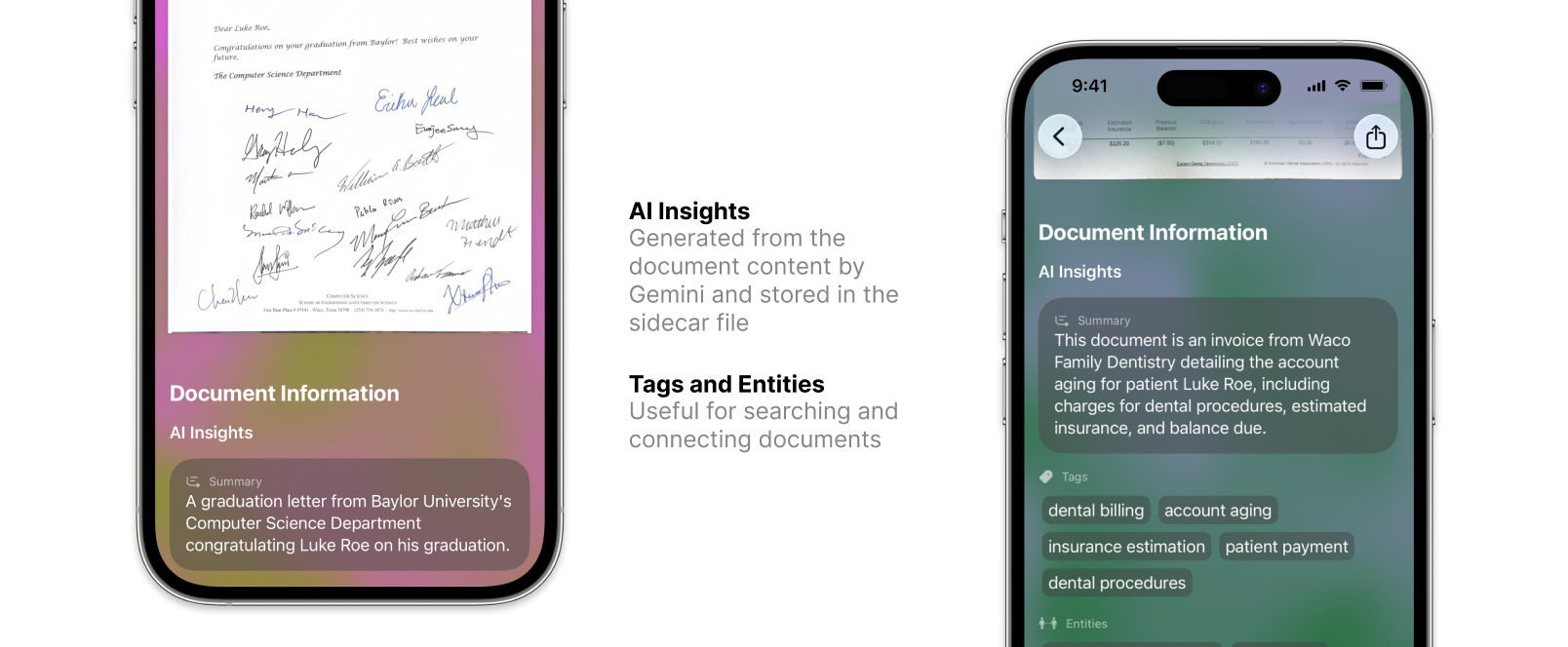
We begin with the iOS app, which is built with the SwiftUI framework. It has a document list, a plus button which opens the document scanner, and a search bar. The document list includes a thumbnail for each document which, when tapped, opens a more detailed view of the document. Notably, this detailed view is that the background is a mesh gradient, the colors of which are derived from a stable document hash. This means that the background color for each document is unique, yet stable, which helps with my visual memory in differentiating between documents.
Anyway, when a user uses the camera scanner to upload a new document, we just use a wrapper for the VNDocumentCameraViewController, which opens the first-class document scanner built from VisionKit, the same one that the Notes app uses. This is helpful because it comes with edge detection, perspective correction and multipage support out-of-the-box.
Once scanned, the document is uploaded to a GCP bucket. This action triggers a cloud function via Pub/Sub, which itself passes the document to DocumentAI to extract the text and some other metadata. Finally, we just throw everything to gemini-2.5-flash to extract tags, entities, and a summary, which gets written to a sidecar file.
Finally, back in the iOS app, when we open the document view we can see the document itself, with all of the data from the sidecar file below. When we search within the app, all of that sidecar data is searchable, both with exact string matching and semantically with a local vector search.